✦ Member guide
How to use Spark.
Everything you need, topic by topic — from creating your profile to meeting in the Lava Lounge, on your phone or on your Meta Ray-Ban Display glasses.
Getting started
Spark is a web app — nothing to download. Create your account on your phone first; you'll connect your glasses afterwards.
- On your phone, open smartsparks.app.
- Sign up with your email and a password, or tap Continue with Google.
- If you used email, confirm your phone number with the text code Spark sends you.
- Build your profile: name, birthday, gender, who you're interested in, photos, a short bio and your interests. Lifestyle details (drinking, kids, exercise and so on) are optional.
- Read the Safety First tips and tap I Agree — Let's Spark!
Glasses setup
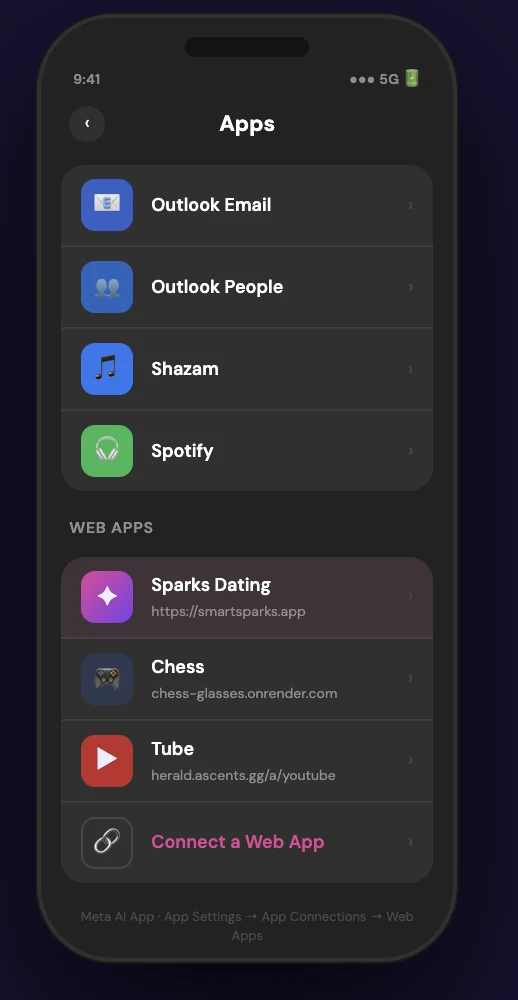
1. Add Spark to your glasses
- Open the Meta AI app on your phone (the app your glasses already use).
- Turn on Developer Mode so Web Apps are available.
- Add a Web App with the address smartsparks.app.
2. Get your Glasses Code (on your phone)
- When Spark asks, Create PIN: pick a 6-digit PIN and enter it twice.
- Spark shows a 6-digit Glasses Code. Keep it on screen.
3. Sign in on your glasses
- Launch Spark from your glasses and choose 👓 Glasses.
- Tap in the Glasses Code from your phone, then your PIN. No typing, no password.
Using the glasses
- Swipe up, down, left or right to move the highlight around the screen.
- Pinch to select whatever is highlighted — a profile, a button, a chat.
- The bottom bar takes you between Discover, Matches, Messages, Explore and Profile.
- To fill in a text field, highlight it and pinch to open the glasses editor, or use the ⌨️ SparkVK keyboard (dictate, handwrite or pick predicted words).
- Prefer talking? See Voice commands.
Discover
Discover shows one profile at a time from people near you who match your preferences.
| To… | Do this |
|---|---|
| Like someone | Tap ♥ (or say "like"). Free members get 8 likes a day. |
| Pass | Tap ✕ (or say "pass"). |
| Super Like | Tap ⭐ to stand out. 1 a day free, unlimited with Premium. |
| See more | Tap the card to open the full profile: all photos, bio, prompts and details. |
| Undo a pass | Rewind ↩️ Premium |
| Change who you see | Use the filter icon to set age range and distance. Recently active and verified-only filters are Premium |
When you both like each other, it's a match and you can start chatting.
↑ Back to topMatches
- The Matches tab lists everyone you've matched with. Tap someone to open their profile or start a chat.
- Liked you shows people who already liked you. Free members see them blurred; with Premium you see who they are and can like them back instantly.
Messages
- Open Messages and tap a conversation. Type, use the 🎤 to dictate, or add an emoji.
- Voice notes: tap the voice-note button to record and send a short audio message.
- 🌐 Translate Premium: tap Translate under any message to read it in your language; tap again for the original. Voice notes can be translated too. Choose your language (22 to pick from) in Profile → Edit Profile → 🌐 Translation Language.
- Read receipts Premium: "Seen" appears under messages they've read.
- The ⋯ menu in a chat lets you start a Date check-in, unmatch, delete the conversation, or report / block.
Explore
| Tab | What it's for |
|---|---|
| 🧭 Nearby | See who's around you right now, as a grid or a list (☰ switches the view). |
| 🔥 Fire or Ice | A quick game: rate profiles hot or cold. |
| ⚡ Spark Score | Your Fire rating from how others rate you, with your hot streak and weekly chart. |
| 💬 Chat Rooms | The way into the Lava Lounge. |
Lava Lounge & trivia Premium
Themed chat rooms where you can get to know people before you match. Open them from Explore → 💬 Chat Rooms — you're signed in automatically with your Spark account.
- Tap anyone's photo or name to see their Spark profile and like them, or to mute, block or report them.
- Every room has a quick This or That / Red Flag, Green Flag vote at the top.
- Pop-up rooms appear for events like game nights and watch parties, with a live countdown.
- Rooms are cleared every night at midnight, and slow mode keeps spam out.
Trivia nights (US Eastern time)
5 quick questions, 15 seconds each, 100 points per correct answer — ties go to whoever answered fastest.
| Day | Room | Time |
|---|---|---|
| Monday | 🎵 Music & Moods | 9 PM |
| Tuesday | 🍜 Foodies Only | 9 PM |
| Wednesday | 💼 Ambitious Minds | 9 PM |
| Thursday | 🕶️ Man Cave (men) · 🌷 Safe Place (women) | 9 PM |
| Friday | 🌙 Friday Night Vibes | 9 PM |
| Saturday | ✈️ Wanderlust | 9 PM |
| Sunday | 🏀 Sports Talk | 7 PM |
Lounge badge: wins raise your level — Starter (3 wins), Pro (5), All-Star (10), MVP (25), Hall of Fame (50) — and the week's champion gets a special badge. Your badge shows on your Spark profile; hide it any time in ☰ Menu → 🎮 Show my Lounge badge.
↑ Back to topYour profile
- Edit Profile to change photos, bio (speak it with 🎤 if you like), prompts, interests and details. Free profiles hold 3 photos; Premium holds 6.
- Get Verified: take a quick selfie copying the pose shown. The Spark team checks it against your photos, and you get a blue ✓ that others can see. (Use your phone — the glasses have no front camera.)
- Who viewed you: see how many people viewed your profile; Premium shows who and when.
- Boost Premium: puts you at the top of Discover for 30 minutes, once a day.
- 👓 Reset Glasses Code lives here too (see Glasses setup).
Safety
Every safety feature is free for every member.
Date check-in
- In the chat with your date, open ⋯ → 🛡️ Date check-in.
- Add where you're meeting, when it starts, and when Spark should check on you (1–4 hours later).
- Tap ✅ Start check-in, and 📤 Share with a friend if you like — they don't need Spark.
- At check-in time Spark asks if you're OK. Tap I'm safe, or I need help to share your live location with a friend; a Call 911 button is right there.
Only you can see your check-in — your date is never told. Turn on notifications so Spark can reach you.
Report or block
From a chat's ⋯ menu, a profile, or a Lounge member's name, choose Report / Block. Blocking is instant; reports go to the Spark team. Unblock people in ☰ Menu → 🚫 Blocked people.
Voice commands (glasses)
Say "Hey Spark" to wake the mic, then your command. Replies play through your glasses speakers. Say "help" any time to see the full list.
| Say | What happens |
|---|---|
| "like" · "pass" · "super like" | Like, pass or Super Like the current profile |
| "read bio" | Hear their bio read aloud |
| "interests" · "how old" | Hear what they're into, or their age and location |
| "open profile" | Open the full profile |
| "discover" · "matches" · "messages" · "my profile" | Jump to that screen |
| "read messages" | Hear your latest unread messages |
| "open Sarah" | Open a chat by name |
| "send …" | Send a message in the open chat, e.g. "send hey, how's your day?" |
| "status" | Hear your match count and unread messages |
| "stop" · "close" | Stop speaking · close the help screen |
Help & FAQ
My glasses say "Code not found" or "Access denied".
Get a fresh code: on your phone, Profile → 👓 Reset Glasses Code. Make sure your glasses are on Wi-Fi.
I forgot my PIN.
Choose Use full login instead on the PIN screen, sign in with your email and password, then set a new PIN.
I paid but Premium isn't on yet.
It usually switches on within a minute. If it hasn't, close and reopen Spark, then contact us.
How do I delete my account?
Email [email protected] from the address on your account and we'll take care of it.
Something isn't working.
Use ☰ Menu → 💬 Send feedback — it reaches the Spark team directly — or email [email protected].
↑ Back to top